
Hand Lab · interactive 3D
Robot hand simulator: pose all 22 joints of the XH-22
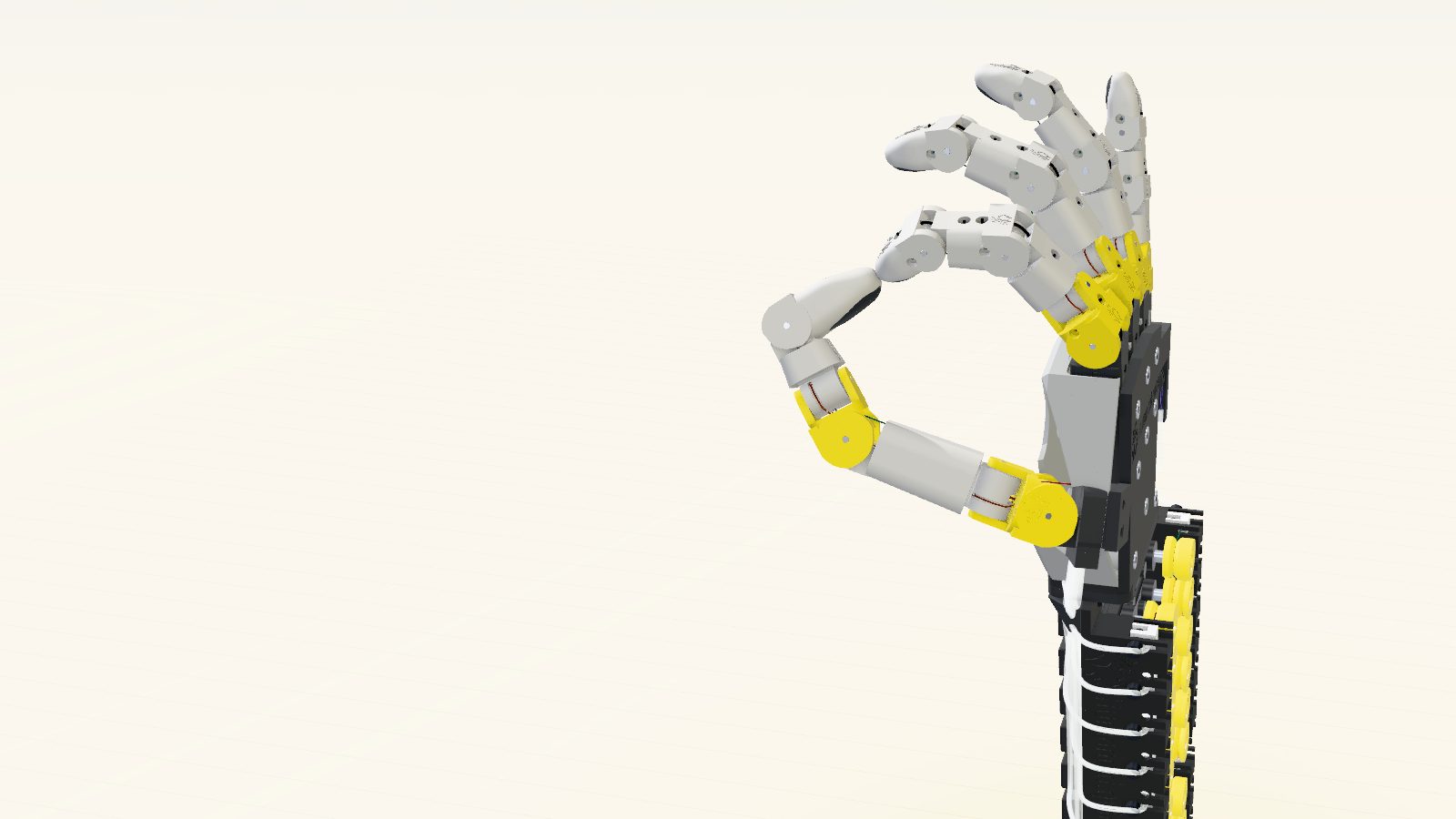
Twenty-two servos. Twenty-nine tendons. One robot hand you can drive from a browser tab. The XH-22 Hand Lab loads the exact CAD of a 3D-printable, tendon-driven hand and moves it with the same kinematics the design was checked against, so every tendon lengthens and shortens the way its routing says it should.
- 22Degrees of freedom
- 22MG90S servos
- 29Tendons in PTFE sheaths
- 34Unique printed parts
Runs in your browser · 5.2 MB download
Pose the hand yourself
Drag a slider and the drive train for that joint lights up: tendon, capstan and servo channel.
Drag to orbit, right-drag to pan (or use the Pan button). Click the model, then scroll to zoom. Keys 1–0 switch poses, ? lists the rest.Open in a new tab
What you’re looking at
The XH-22 is a human-size right hand made from 34 printable parts. Nothing inside the hand has a motor. The 22 MG90S micro servos sit on two decks behind the wrist, eleven rows of two, and each one pulls braided Dyneema line through a PTFE sheath to exactly one joint. No coupled fingers, no shared drive. That’s why the lab gives you 22 independent sliders instead of five.
Four fingers get four joints each. The thumb gets five. The last one is easy to miss: a pivot at the base of the little-finger metacarpal that cups the palm, the way your own palm hollows when thumb and little finger meet.
| Group | Joints | Actuation |
|---|---|---|
| Index, middle, ring, little (×4) | MCP flexion, MCP abduction, PIP, DIP | 3 flexor tendons + 1 abduction loop |
| Thumb | CMC flexion, CMC abduction, MCP flexion, MCP abduction, IP | 3 flexors + 2 loops |
| Palm arch | Little-finger metacarpal cupping | 1 loop |
Source: XH-22 design files (parametric OpenSCAD, STEP export). 29 tendon strands in total.

Why the joints don’t fight each other
Most tendon hands have a coupling problem. Bend the knuckle and the tendons for the fingertip get dragged along with it, so the controller spends its life correcting. The XH-22 gets around most of that with geometry. Every joint pivots on split stub pins, which leaves the centre of the joint open, and the tendons for the joints further out pass straight through that centre. Move one joint and the others’ tendons barely change length. The leftover error is the radius of the tendon bundle itself – under a millimetre.
Flexors wrap a pulley plate that sits concentric with the pin, 4.7 to 8.5 mm in radius. Tendon travel is simply r·θ across the whole range. Linear, and easy to calibrate.
Side-to-side joints and the palm arch run on loops instead: one servo, two strands on a double capstan, driven both ways. The Bowden sheaths stop at the root of each finger module, so bending the wrist or a neighbouring finger leaves a tendon’s length alone, to first order. Friction still climbs with every bend in a sheath, so on a real build they want long, smooth arcs down the forearm.
Try it: open the View tab and set the section cut to Coronal. Every pass-through tendon crosses its joint right at the centre.
Force budget · design estimates
- 36 NStall pull per tendon at 6 V
- ≈25 NLeft after sheath friction
- 8–10 NAt the fingertip from the DIP flexor
- ≈2 NAt an extended fingertip from the MCP flexor alone
What you can do in the lab
Start with the presets. There are 19, from the Humanoid Guide pose the lab opens in to the four thumb-to-fingertip pinches that came out of an opposition search over the thumb’s workspace. Keys 1 to 0 cover the everyday ones, G brings back the brand pose.
Then take a joint by hand. Each slider carries its PCA9685 board and channel, and hovering one lights up its tendon and capstan in the 3D view. Motion is rate-limited to MG90S speed, so the hand can’t move faster than the real servos would. The telemetry table shows every servo’s angle, pulse width in microseconds and tendon take-up, and the scope plots the last eight seconds.
- Sequences: a finger wave, counting to five, an opposition tour, piano taps, a power grasp, rock-paper-scissors and a full sweep of every actuator.
- Keyframe recorder that exports a 50 Hz CSV of pulse widths for all 22 channels, ready to stream to two PCA9685 boards.
- X-ray shells, true section cuts with solid caps, an exploded view and a left-hand mirror.
- Pad-gap gauges for thumb opposition and a collision meter that turns red the moment two links touch.
Two poses are hard limits of the geometry, not bugs. At a full fist the fingertips meet the palm cover. Drive two neighbouring fingers towards each other past about 10° of abduction and they collide, so spreading has to be coordinated in software. The collision meter will tell you when you’ve found the edge.
Questions
Is the XH-22 a finished robot hand?
It’s a complete parametric design. Every part renders as a single watertight solid, the full joint ranges were checked for link-to-link collisions in CAD, and the Hand Lab runs on the exact STEP geometry: 704,538 triangles, matching the design’s own kinematics to within 0.001 mm at the fingertips. The force figures are estimates, not bench measurements, and the elastic return cords are the part to tune first on a real build.
What drives the 22 joints?
22 MG90S metal-gear micro servos on two PCA9685 16-channel PWM boards, run from an ESP32 or Arduino with a 5–6 V supply rated for at least 10 A. Flexors return on 1 mm elastic cord; abduction joints and the palm arch are driven both ways by tendon loops.
Can I play the motions on real servos?
Yes. Record keyframes in the Motion tab and export the servo CSV: 50 Hz pulse widths in microseconds for all 22 channels, in PCA9685 board and channel order. Poses can also be shared as a link or copied as JSON.
Does the simulator work on a phone?
It runs in any current browser with WebGL. On a phone it opens full screen with a lighter render mode and the panels behind tabs. A desktop screen shows the joint sliders, the 3D view and the telemetry side by side.